
Input and flows
EmuLabZip can touch a device, type on it and press its keys; it can record what you do into a flow, play the flow again, and export it as a Maestro flow or as a shell script. All of it is for Android: iOS has no public way to send touches or to read them.
Touch, type and press#
| Control | CLI | What it does |
|---|---|---|
| Tap | emulabzip control tap <x> <y> | A touch at a point of the screen, in pixels, as in a screenshot. |
| Swipe | emulabzip control swipe <x1> <y1> <x2> <y2> [--ms 300] | A drag. From a point to itself it is a long press. |
| Text | emulabzip control text "hello" | Types into the field that has focus. Printable ASCII only. |
| Key | emulabzip control key back | back, home, app_switch, enter, tab, delete, volume_up… |
| Launch | emulabzip control launch <app> | Starts an app as the launcher would. Also on iOS. |
Positions are checked (at most 20000 pixels), text is checked (it cannot contain %s, which Android reads as a space, or
anything input text cannot type), and keys are a list of names, so nothing reaches a shell unchecked. The same controls are
MCP tools: tap, swipe, input_text, press_key, launch_app.
In the app, Overview → Screen → Interact makes the picture of the screen touchable: a click is a tap, a drag is a swipe, and a press held for half a second is a long press. Controls has a card for text and keys.
Recording a flow#
emulabzip flow record --name "Add to cart" --app com.example.shop # touch the emulator, then press Ctrl+CTouch the device itself: on an emulator, its own window. EmuLabZip reads the touchscreen (getevent) and keeps each tap,
long press and swipe, and the pauses between them (a pause of a second or more, to the nearest tenth of a second). The flow
starts with a step that launches the app, unless you pass --no-launch.
Two things are not recorded, and the app says so:
- Taps sent by EmuLabZip or by
adb shell input. They go in higher up in Android and never reach the touchscreen, so clicking the Interact picture or playing a flow while recording does not add steps. - Typed text. The keyboard is not the touchscreen. Add a text step afterwards.
After each touch the screen is read again in the background, so the next tap can remember what it hit: the id of the view
(a Compose testTag, an Android resource id) or its text. Reading a screen takes two or three seconds, so a tap that comes
sooner than that after another is kept as a point.
Flows are JSON files in EmuLabZip's flows folder, shared by the app and the command line:
emulabzip flow list
emulabzip flow show add-to-cart          # the steps; --json for the file
emulabzip flow play add-to-cart          # Ctrl+C stops it
emulabzip flow remove add-to-cart
Playing scales the points to the screen it plays on, when its size differs from the one the flow was recorded on. A step is followed by a third of a second, so the screen can react.
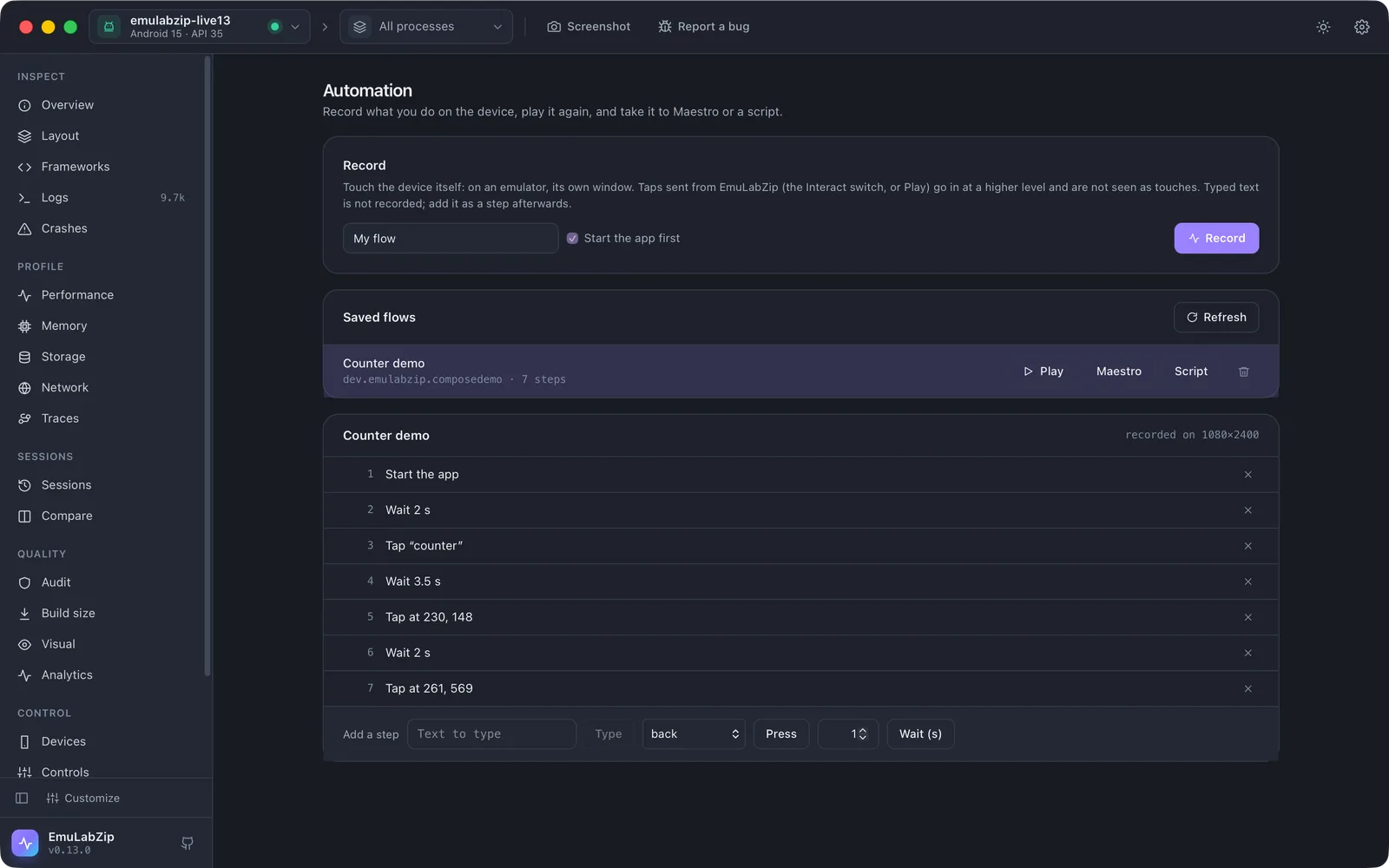
The Automation view#
Automation in the sidebar records and plays flows, lists the saved ones, and shows the steps of the one you pick. You can delete a step, or add a text, a key or a pause by hand, then Save changes. Maestro and Script save the flow in those formats.
Export#
emulabzip flow export add-to-cart --maestro > add-to-cart.yaml
emulabzip flow export add-to-cart --script --out add-to-cart.sh
Maestro. A tap that knows its view says tapOn: id: "checkout" or tapOn: "Checkout"; the others say a point as a
percentage of the screen (point: "50%,80%"). Text is escaped for Maestro's regular expressions, then quoted for YAML. Keys use
Maestro's names (Back, Home, Enter, Backspace…), and a key it has no name for is left as a comment. Pauses become
waitForAnimationToEnd. The file has no assertions: add them, since a recording knows what you did and not what it should show.
Script. A shell script of emulabzip control … lines with sleeps between them, for the device in EMULABZIP_DEVICE.
Limits#
- Android only. A flow cannot be recorded or played on a simulator.
- Labels are best effort. A screen that changes without a touch (a timer, a network answer) can give a tap the name of what was there a moment before; the point is always kept, and Maestro uses the label only when there is one.
- A flow has at most 5000 steps, and a pause at most a minute. An assistant's
play_flowrefuses flows that take more than two minutes; play them withemulabzip flow play.