
Network
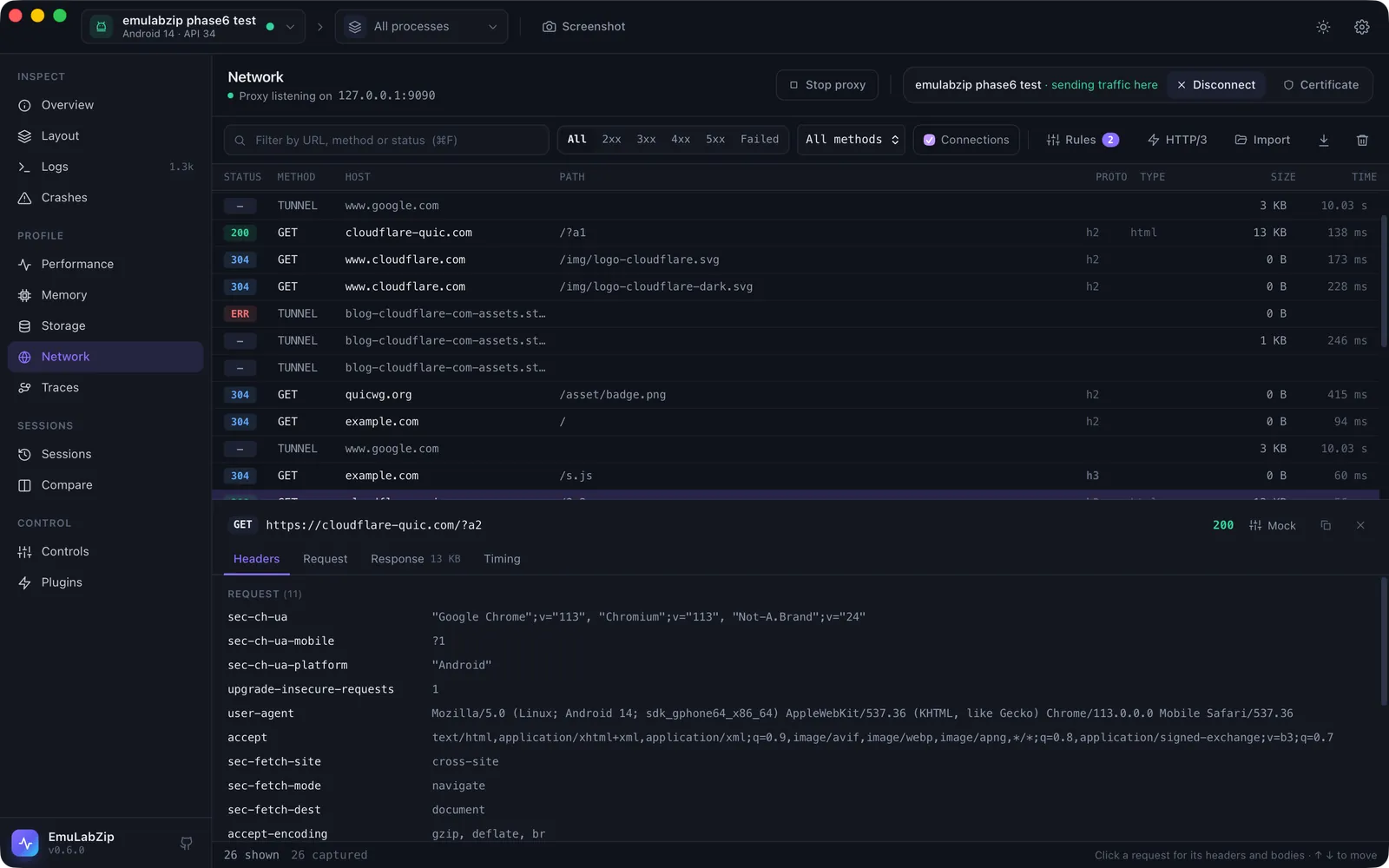
The Network tool is a debugging proxy built into EmuLabZip. It sits between your app and the internet, decrypts HTTPS with a certificate authority that lives only on your computer, and lists every request with its headers, body and timing. You do not change your app.
Quick start#
- Open Network (⌘6) and pick your device.
- Press Certificate once per device, so it trusts EmuLabZip's certificate (see below).
- Press Connect. The proxy starts if it is not running, and the device sends its HTTP and HTTPS traffic to it.
- Use your app. Requests appear as they finish. Click one to see its headers, body and timing.
- Press Disconnect (or just quit) when you are done. EmuLabZip puts the device back the way it found it.
From a terminal:
emulabzip ca install                 # once per device
emulabzip net --har capture.har      # Ctrl+C to stop; the device is restored
How a device reaches the proxy#
The proxy only listens on 127.0.0.1 of your computer, never on the network.
| Android | iOS Simulator | |
|---|---|---|
| Route | adb reverse tcp:<port> tcp:<port> makes 127.0.0.1:<port> on the device reach your computer, then settings put global http_proxy 127.0.0.1:<port> | The simulator shares the Mac's network, so the Mac's own HTTP and HTTPS proxy is pointed at EmuLabZip |
| Scope | The one device you connect | Every app on the Mac while it is on |
| Undone by | Disconnect, quitting, or emulabzip net stopping. Only the forward EmuLabZip made is removed; Metro's tcp:8081 stays | Disconnect, quitting, or the next start if EmuLabZip was killed |
| Works with | Emulators, USB devices, wireless debugging | Simulators on macOS |
For the Mac, EmuLabZip saves the proxy settings of every network service before changing them and writes them back
exactly, including a proxy that was switched off but still has an address. If macOS asks for an administrator
password the first time, that is networksetup changing system settings.
The certificate#
To read HTTPS, EmuLabZip answers with a certificate for the site, signed by its own certificate authority. The
device has to trust that authority. It is created on first use, named EmuLabZip CA, and kept in
~/Library/Application Support/EmuLabZip (%APPDATA%\EmuLabZip on Windows, ~/.local/share/EmuLabZip on Linux),
with the private key readable only by you. Set EMULABZIP_HOME to use another folder.
| Device | What Certificate does | Which apps trust it |
|---|---|---|
| iOS Simulator | simctl keychain add-root-cert | All of them. Restart apps that were already running |
Android emulator whose image allows adb root (Google APIs, AOSP) | Adds it to the system store | Every app, until the device restarts |
| Android image from Google Play, or a physical device | Copies emulabzip-ca.crt to Downloads and opens Settings so you can install it as a user certificate | Chrome and apps that opt in. Your own debug builds can opt in with the snippet below |
On a rootable image adbd is left running as root, as after adb root. Running Certificate again is safe: it
replaces the file instead of stacking another copy.
Letting your debug build trust it#
Since Android 7 apps ignore user certificates unless they ask for them. Add this to your debug build only and
reference it from the manifest of that build (android:networkSecurityConfig="@xml/network_security_config"):
<?xml version="1.0" encoding="utf-8"?>
<network-security-config>
    <debug-overrides>
        <trust-anchors>
            <certificates src="system" />
            <certificates src="user" />
        </trust-anchors>
    </debug-overrides>
</network-security-config>
Release builds are not affected, because debug-overrides only applies to debuggable apps.
Without installing anything#
With the proxy running, a browser on the device can fetch the certificate from the proxy itself:
http://127.0.0.1:9090/ca.crt (DER, for Android and iOS) or /ca.pem.
What you see#
Each row is one request. The columns are the status, method, host, path, type, size and time. Filter by text (URL, method or status), by status class, or by method. Use ↑ ↓ to move through the list.
The detail pane has four tabs:
| Tab | Shows |
|---|---|
| Headers | Request and response headers |
| Request | The body that was sent |
| Response | The body that came back |
| Timing | The protocol, time to the first byte and time to the end |
Bodies are decoded for reading (gzip, deflate, Brotli, zstd): you see the size on the wire and the decoded size. JSON is formatted, images are shown, and binary data is shown as a hex dump. The proxy forwards the bytes exactly as they were; only the copy you read is decoded.
Connections are what the proxy could not decode: non-HTTP traffic, and apps that refuse the certificate. They are listed so you know they exist, with the reason. WebSockets are listed with a Messages tab that shows each message (see WebSocket messages).
The Proto column shows what the proxy spoke to the server: h1, h2 or h3.
More than watching#
- Rules: answer a request yourself, slow it down, block it or stop it and edit it. See Mocks and breakpoints.
- Import: open a
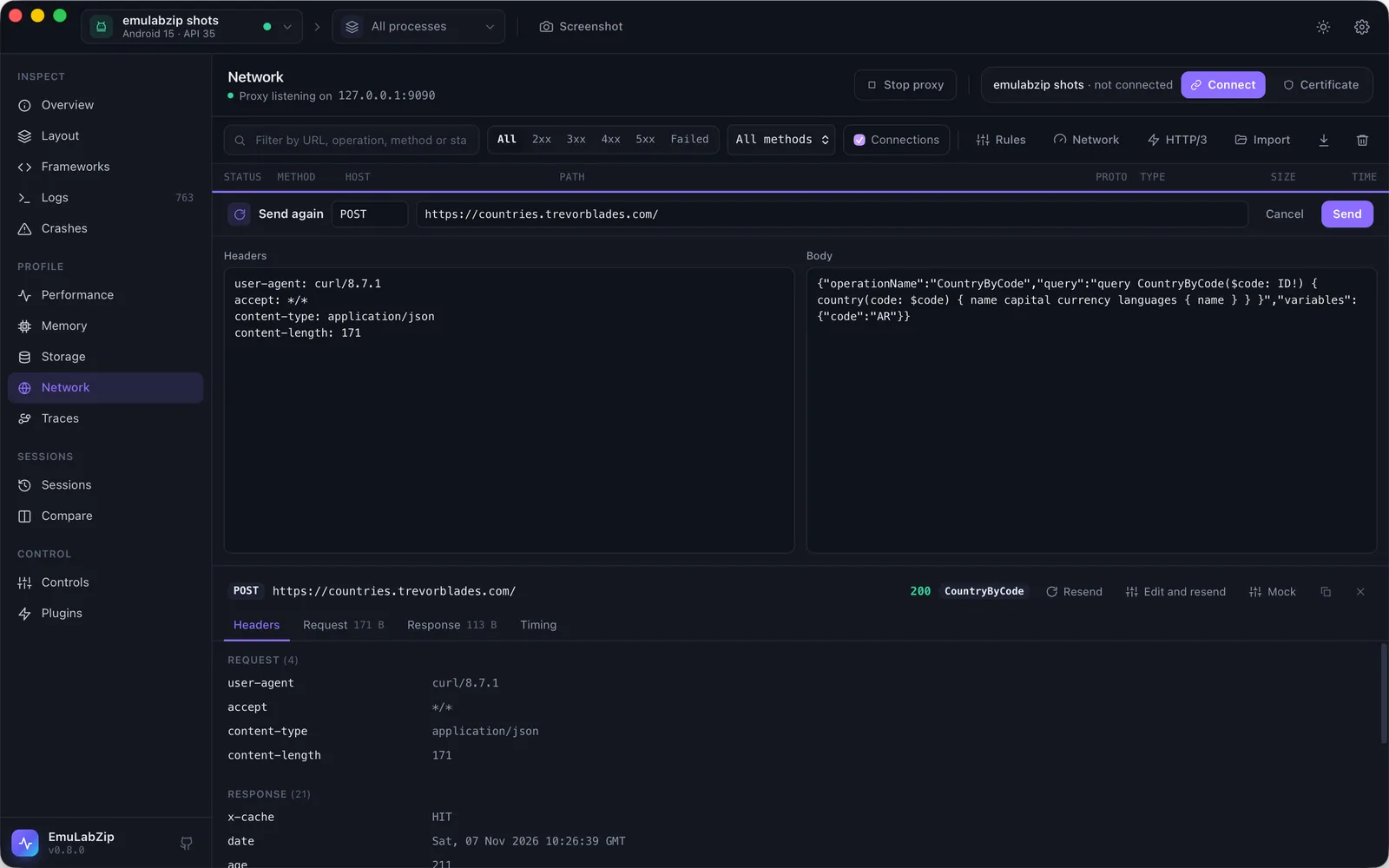
.pcapor.pcapngcapture as requests. See Importing a capture. - Send again: Resend sends a request once more as it was; Edit and resend lets you change the method,
address, headers and body first. The copy is a new line in the list marked
RESEND. Rules and breakpoints do not apply to it, since you chose to send it. A mocked request, a WebSocket and a request read from a capture cannot be sent again, and neither can one whose body was too big to keep. - GraphQL and gRPC: operations are named in the list, and bodies are read the way their protocol means. See GraphQL and gRPC and protobuf.
- Network conditions: a slow, laggy, lossy or missing connection. See Network conditions.
- Replay: answer from a HAR file or a recorded session, so the app runs without the internet. See Replaying a recording.
- HTTP/3: see below.
Apps that pin their certificate#
Some apps (many Google services, banking apps) accept only their own server's certificate. EmuLabZip cannot decrypt them without breaking them, so after a host rejects the certificate once, later connections to it are passed through unchanged. The app keeps working, the list shows one failed connection with the reason, and a banner names the hosts. Decrypt again retries them, for example after you installed the certificate.
Export#
The download button saves the requests as a HAR file, readable by
Chrome DevTools, Firefox and most API tools. Bodies are stored decoded. Connections are left out. On the command
line: emulabzip net --har capture.har.
HTTP/3#
A device behind an HTTP proxy never speaks QUIC to it, so HTTP/3 only concerns the proxy's second leg, to the server.
Servers announce HTTP/3 in an Alt-Svc: h3=":443" header. The proxy remembers it per host, and with HTTP/3 → Use HTTP/3
to servers switched on (it is off by default), later requests to that host go over QUIC. If QUIC fails (a network that
blocks UDP, a server that does not answer), the request falls back to HTTP/2 or 1.1 and the host stays on TCP for 10
minutes. Flows show h3 in the Proto column when it worked. An HTTP/3 response is read in full before it is passed on,
so a very large download is not streamed.
Hide HTTP/3 from apps (on by default) removes the h3 entries from the Alt-Svc header the app receives. Without it
an app can learn that the server speaks HTTP/3 and try QUIC directly, around the proxy, and its traffic would vanish
from the list. The flow still records the original header. On the command line: emulabzip net --http3, and
--show-h3 to show apps the offers.
Limits#
- Only the first 10 MB of each body is stored. The rest still reaches its destination.
- The list keeps the newest 10,000 requests.
- An app that speaks QUIC directly, around the proxy, cannot be decoded. With the default setting apps are not told about HTTP/3, so they stay on HTTP/2 through the proxy.
- The proxy is for your own apps and devices. Do not point it at traffic you are not allowed to inspect.
Command line#
emulabzip net                       # the only running device; prints one line per request
emulabzip net --json | jq 'select(.status >= 400)'
emulabzip net --no-connect --port 9191   # only run the proxy
emulabzip net --rules rules.json    # mock, delay or block requests
emulabzip net --http3               # talk HTTP/3 to servers that offer it
emulabzip net --replay run.ezsession   # answer from a recording; --passthrough lets the rest through
emulabzip net import capture.pcap   # read a packet capture
emulabzip ca install                # make the device trust the certificate
emulabzip ca path                   # where the certificate file is
See Command line for every option.