
Visual regression
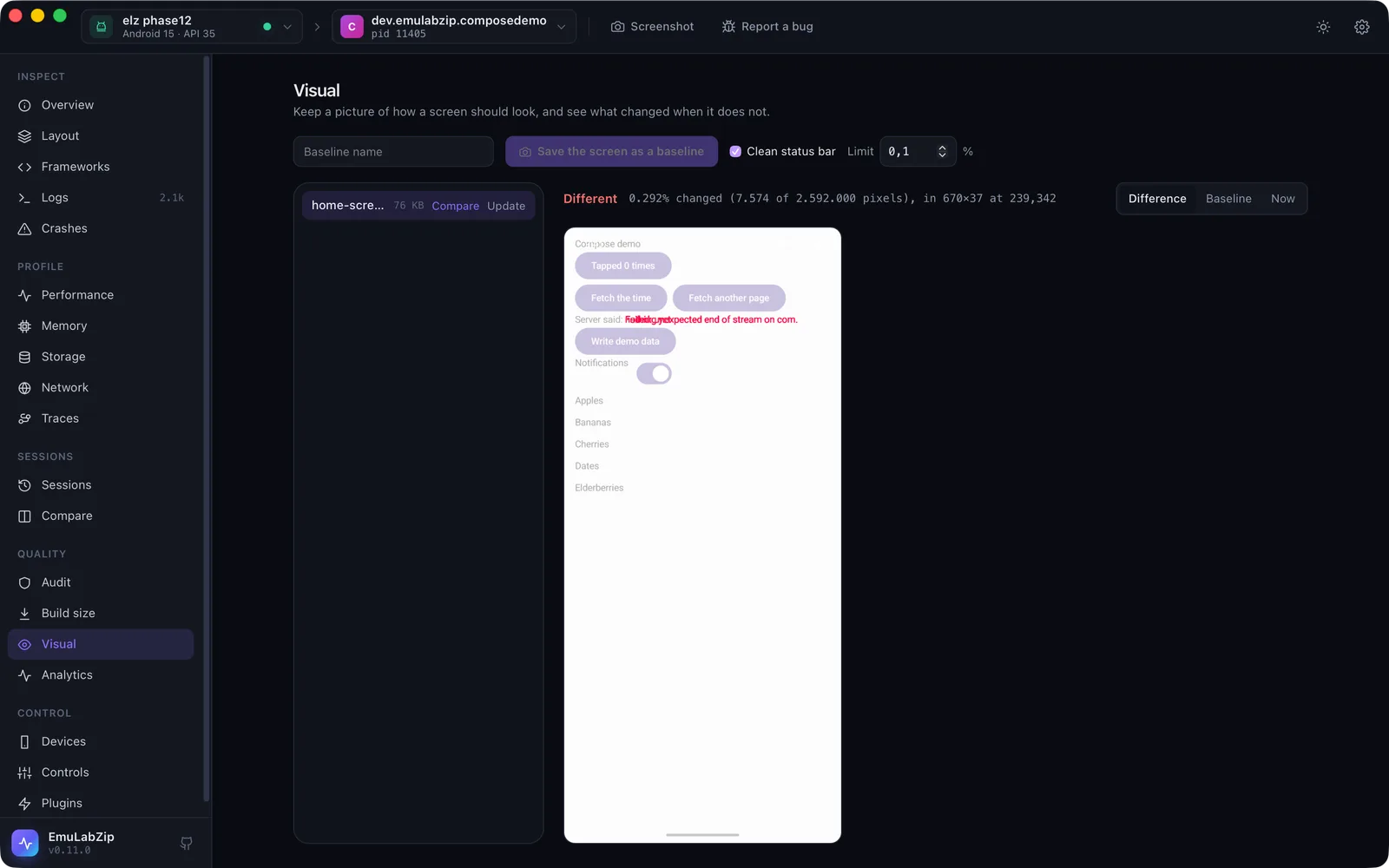
Keep a picture of how a screen should look (a baseline) and see what changed when it does not.
emulabzip visual capture home --status-bar          # save the screen as a baseline
emulabzip visual compare home --status-bar          # exit 1 when more than the limit changed; draws the difference
emulabzip visual update home --yes --status-bar     # accept the screen as the new baseline
emulabzip visual list
emulabzip visual diff a.png b.png -o diff.png       # two screenshot files
emulabzip visual session a.ezsession b.ezsession -o diffs/    # the screenshots of two recordings, in order
Baselines are PNG files in the visual/ folder of the project (or [visual] baseline_dir), named with letters, digits,
., _ and -. A baseline is never replaced by accident: capture refuses a name that exists, and update needs
--yes.
What counts as a change#
Each pixel is compared with its baseline, channel by channel. A pixel counts as changed when a channel differs by more
than the tolerance (8 of 255 by default, which absorbs anti-aliasing and encoder rounding). The comparison reports
how many pixels changed, the percentage of the screen, and the smallest rectangle that holds every change. The difference
is drawn as a PNG, with the changed pixels in red over a faded copy of the screen. The limit is a percentage
(--threshold, 0.1 by default).
Screens of different sizes are not compared: they come from different devices, orientations or display sizes, and the error says so.
The clock and the battery#
The status bar changes every minute. --status-bar shows a clean one for the shot (9:41, full battery and signal) and
puts the real one back afterwards, so those pixels are the same every time. Anything else that moves (an ad, a video, a
date) can be left out of the comparison with ignore regions.
In emulabzip.toml#
[visual]
threshold_percent = 0.1          # how much of the screen may change
tolerance = 8                    # how far a colour channel may differ before a pixel counts
baseline_dir = "ui/baselines"    # relative to the project; default "visual"

[[visual.ignore]]                # parts of the screen to leave out, in pixels
name = "clock"
x = 0
y = 0
width = 1080
height = 120
In ci#
emulabzip ci -o run.ezsession --visual home --fail-on-visual -- ./gradlew connectedCheckAfter the command, the screen is compared with the baseline home, the result goes into the Markdown summary, and with
--fail-on-visual the run fails over the limit. The baseline is read before anything runs.
Between devices#
Compare two screenshots from two devices with visual diff, or capture on one and compare -d <other> on another. They
have to have the same size in pixels.
On the desktop#
The Visual view lists baselines (kept in EmuLabZip's own visual folder), saves the screen as one, compares it, and
shows the difference, the baseline or the screen now. Update asks before it replaces a picture.
For assistants#
Over MCP, visual_compare returns the numbers and the difference picture. It does not create or replace a
baseline.
Limits#
- A baseline is a screenshot, so it can hold anything that was on the screen. Do not commit one of a screen with personal data.
- It compares pixels, not meaning: a one-pixel shift of everything changes everything. Use the tolerance and the limit to taste, and keep the status bar clean.