
Timeline and screen video
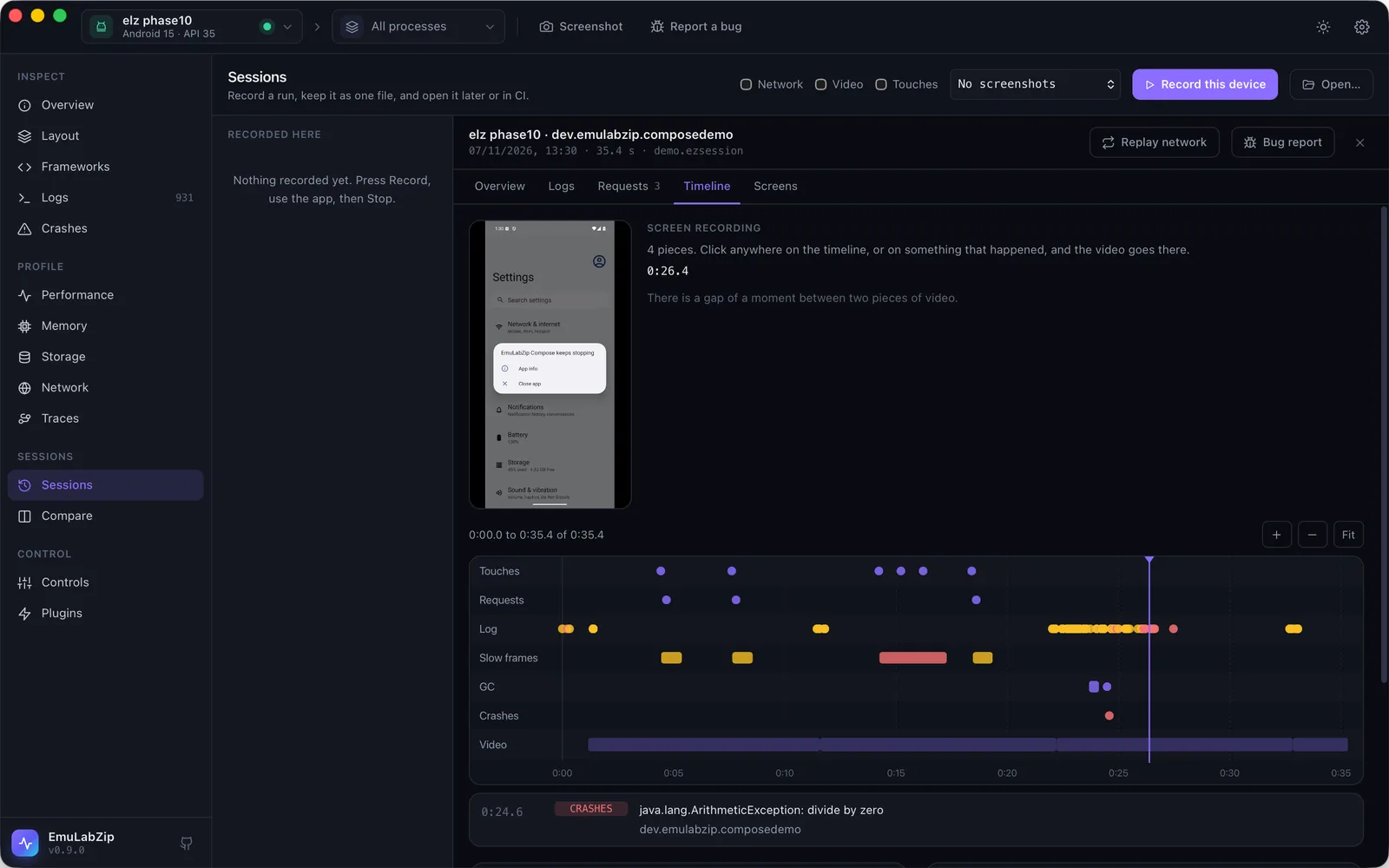
A session is a pile of separate streams: log lines, samples, requests, crashes. Each one stamps time its own way, so seeing what happened just before the crash meant opening four tabs and doing arithmetic. The timeline puts all of it on one axis, and the screen video lets you watch it.
What is on the timeline#
| Lane | What | Where it comes from |
|---|---|---|
| Touches | Taps, long presses and swipes, with where on the screen | getevent on the touchscreen (Android; see below) |
| Requests | Each request, as long as it took, red when it failed | The proxy (--network) |
| Log | Warnings and errors | The log |
| Slow frames | Frames the app took too long to draw. A stutter of thirty frames is one event: a burst | dumpsys gfxinfo framestats (Android) |
| GC | Garbage collections, with how long they took and paused the app | ART's own log lines (Android) |
| Crashes | Each crash, at the moment it happened | The device's crash records |
| Screenshots, Video | Where each screenshot was taken, and what each piece of video covers | The recording |
Recording what the timeline needs#
emulabzip session record -o run.ezsession --app com.example.app --network --video --taps--tapsrecords touches. They are read from the kernel's input device, so they are the touches that arrive there: a finger on the emulator window, or an event sent through the emulator console (which the app takes for a click only when the event carriesABS_MT_PRESSURE).adb shell input tapis injected higher up, inside Android, and is not seen. iOS does not give the simulator's touches to anything outside it, so this is Android only. The kernel reports a position only when it changes, so the very first touch of a recording can have none: it is kept, and shown as "Tap" without coordinates.--videorecords the screen in pieces of 30 seconds (--video 10for 10). See Screen video.- Slow frames and garbage collections need no option: they are recorded when there is an app, on Android.
In the desktop app, the Sessions view has Video and Touches checkboxes next to Network.
One clock#
Every stream stamps time its own way: the log prints the device's local time with no year, samples count from when they started, requests use this computer's clock, and touches and frames count from when the device booted. When a recording starts, EmuLabZip asks the device for its clock, its time zone and its uptime, and keeps them in the session. The timeline uses them to put every stream on this computer's clock, in milliseconds from the start of the recording.
A recording made before EmuLabZip 0.10 did not measure it. Its log times are worked out from the first line (it was written moments after the start, which says what the zone must have been), and the timeline says they are estimated.
Reading it#
In the app, open a session and its Timeline tab. Hover over an event to read it, click it to see more and to put the video there, drag to move along the run, and press ⌘ (Ctrl) and scroll to zoom. Open jumps to the request, the log or the crash behind an event.
On the command line:
emulabzip session timeline run.ezsession                    # everything, oldest first
emulabzip session timeline run.ezsession --lane requests --lane crashes
emulabzip session timeline run.ezsession --json             # for scripts
+00:04.174 taps Tap (527, 1464) (154 ms)
+00:04.206 frames 6 slow frames, worst 118 ms (216 ms) !
+00:04.749 requests GET time.akamai.com/ 200 (83 ms)
+00:50.000 crashes java.lang.IllegalStateException: boom !!A lane keeps at most 3,000 events. When there are more, the errors are kept, and the rest are spread evenly; the count at the end of the output (and in the app, under the lane's name) says how many there were.
An assistant can read it with the session_timeline tool of the MCP server: by lane, capped, oldest first.
Screen video#
The screen is recorded with screenrecord on Android and simctl io recordVideo on the iOS Simulator, in short pieces.
That has three reasons: Android stops screenrecord after three minutes whatever you ask, a movie file can only be read
once the tool has closed it, and a short piece is a clip you can use as it is, without a video editor on the machine.
- The next piece starts while the last is still being copied off the device, so the gap between two is a fraction of a second on Android and about a third of a second on the Simulator.
- Android pieces are scaled so the long side is 1280 pixels, at 2 megabits per second: about 7 MB for 30 seconds. The Simulator's are its own size, H.264.
- Stopping the recording keeps what the piece in progress has recorded.
- Video is stored in the session without compression, as it is compressed already.
emulabzip session video run.ezsession -o pieces/ writes the pieces out as .mp4 files. In the app, the Timeline tab
plays them: the video and the timeline follow each other.
Video is easy to forget about when you share a file. A screen can show anything: messages, an email, a password. Look at the video before you attach a recording to a public issue.
In a bug report#
A report made from a session with video includes the piece that holds the crash (the last piece, when there was none),
and a strip of the last minute before the crash: one row per kind of thing, one dot for each. The strip is drawn
from numbers and has no script. A clip up to 20 MB is part of the HTML file; a bigger one is written next to it as
emulabzip-report.mp4, which the file refers to, so keep the two together. Leave it out with --without video.
See Bug reports.