
Crashes
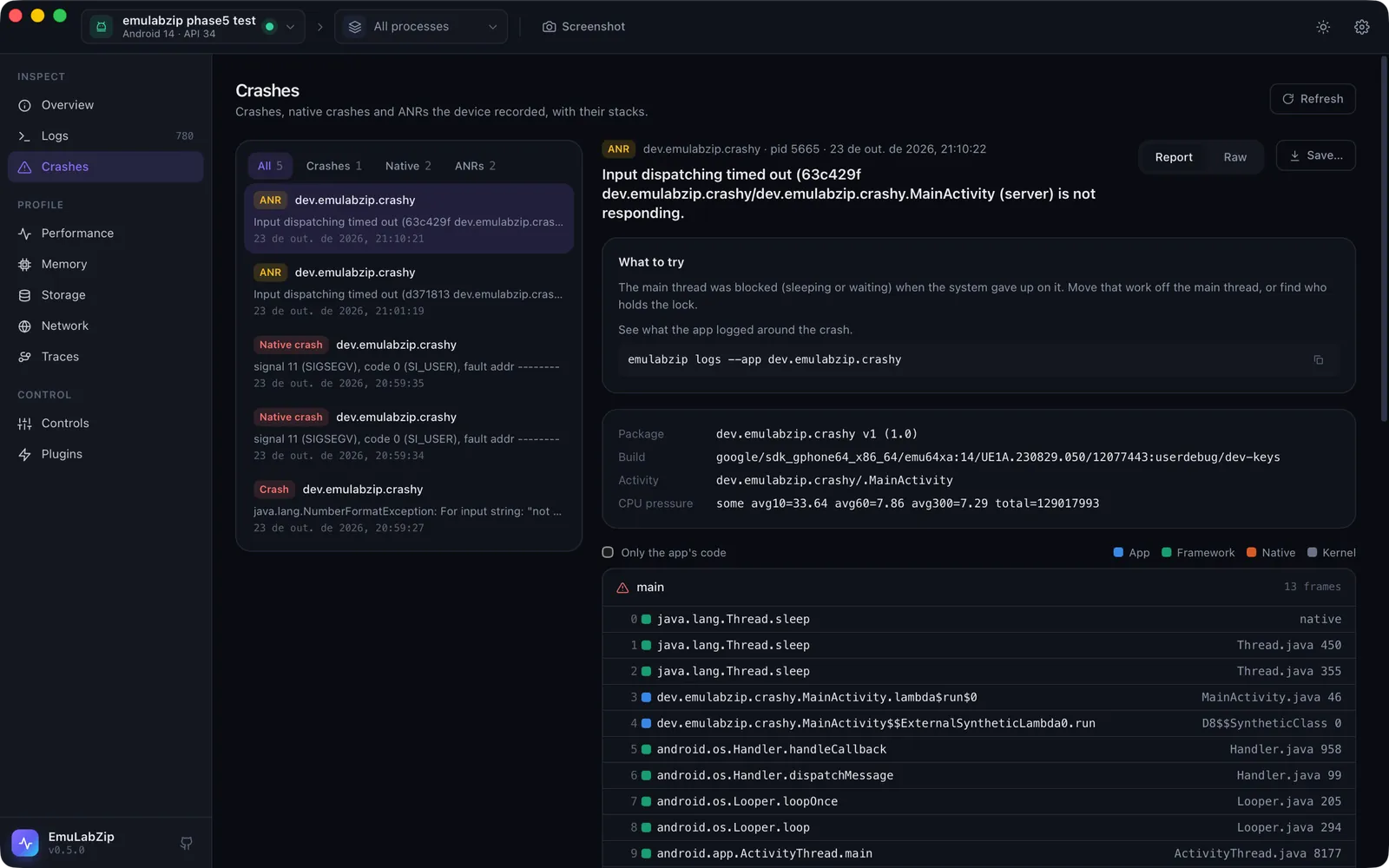
The Crashes tool lists the crashes, native crashes and ANRs a device has recorded, and opens each one with its stack, the facts the device wrote down and what to try next. New ones show up by themselves, with a notification and a badge in the sidebar, while EmuLabZip is open.
| Kind | Android | iOS Simulator |
|---|---|---|
| Crash | An uncaught exception, with its Caused by: chain | A Swift runtime failure, an abort() or an uncaught NSException |
| Native crash | A fatal signal, from the tombstone | A bad memory access (EXC_BAD_ACCESS) and similar |
| ANR | Application Not Responding, with the stack of every thread | not applicable |
Quick start#
- Open Crashes (⌘8). The newest crash opens by itself.
- Pick another one on the left, or filter by kind, or by the app picked in the toolbar.
- Report shows the hints, the details and the threads. Raw shows the report as the device wrote it. Save… writes it to a file.
- A release build scrambles its names. Add its
mapping.txt, source map or dSYM when the crash asks for it, and the crash is read again, with Readable and Original to switch between them. See Readable stacks. - Report a bug in the toolbar packs the crash, a screenshot, the log and the failed requests into one file. See Bug reports.
From a terminal:
emulabzip crashes --app com.example.app          # newest first, with an id for each
emulabzip crash dropbox:data_app_crash:20261023205928
emulabzip crash <id> --all-threads               # every thread, not only the one that crashed
emulabzip crash <id> --raw                       # as the device wrote it
emulabzip crash <id> --mapping mapping.txt       # readable, with a file you name
Where the reports come from#
Android. The system keeps a copy of every crash, ANR and tombstone in DropBox, and the shell may read it with
dumpsys dropbox --print <tag>. That means it works on any device and any emulator, with no root and nothing
installed. EmuLabZip reads data_app_crash, system_app_crash, data_app_native_crash, SYSTEM_TOMBSTONE,
data_app_anr and system_app_anr. The ids look like dropbox:data_app_crash:20261023205928. The system rate-limits
repeated crashes of one app, so a crash that loops is listed less often than it happens.
iOS Simulator. macOS writes a .ips report to ~/Library/Logs/DiagnosticReports when a process crashes, simulated
apps included. A report belongs to a simulator when the app's path runs through
CoreSimulator/Devices/<udid>. EmuLabZip reads the newest 200 files there and in Retired. The ids look like
ips:MyApp-2026-10-23-210246.ips. macOS writes the report a few seconds after the crash.
Reading a report#
The thread that crashed is open; the others are folded away. For an ANR the blocked main thread comes first. Each frame has a coloured square for whose code it is, the same four colours as the flame graph:
| Colour | Meaning |
|---|---|
| Blue | The app's own code |
| Green | The platform: the Android framework and runtime, UIKit, Foundation, the Swift runtime |
| Orange | Native libraries |
| Grey | The kernel |
Only the app's code hides everything else, which is how to read a native stack that is mostly runtime internals.
A Java crash shows one section per exception of the chain, and the last one, the root cause, is the one marked as crashed. The title of the crash is that root cause.
Hints#
EmuLabZip says what it can tell from the report:
- Class names that look obfuscated: add the build's
mapping.txtand they are read for you. See Readable stacks. - JavaScript positions of a React Native app: add the source map of the bundle.
- Native frames of the app without symbols:
ndk-stack -sym <folder> -dump tombstone.txt, orllvm-symbolizer. The BuildId has to match the build that crashed. - iOS frames of the app without symbols: add the build's dSYM and they are read with
atos, or run theatoscommand shown, with the architecture and the load address filled in. - An ANR whose main thread was sleeping or waiting: the main thread was blocked.
- An ANR on a device that was short of CPU: the app may not be at fault.
- A native crash whose signal came from
kill(): it was sent, not raised by a fault.
Try it#
tools/crash-app (Android) and tools/crash-app-ios (iOS Simulator) are tiny apps that fail on purpose, so you can
see each kind without writing one. Each has an install.sh and a README.